TRCH Analytics, by TRCH
Find out if your website is bringing in customers.
One dashboard that tells you, in plain English, what your website did and whether it's working, with a short email every month. We set it up with you on a call, and a person answers your email after that.
Per website. Try it for 14 days, or your money back.
“Is the website actually bringing in customers?”
From people who use it
“Finally I can see what our website is producing for us without confusion. Now I can hold my vendors accountable with data. Where has this been all these years!?”
 James Edmonds, President, First Day Home Care
“This is mandatory for all our clients. Clear, concise, in plain English analytics and metrics we rely on.”
 Seth Cahill, Co-Founder, GTM Advisors
“I have a business to run. I need to know what my website is doing without having to learn another language. This is perfection!”
 Shirley Calogero, Owner, Raven's Bakehouse
You have Google Analytics. You just don't open it.
Somebody set it up when the site launched. Maybe your web designer, maybe you on a Saturday. Since then you've logged in a couple of times, clicked around, and closed the tab.
That's a fair reaction. Google Analytics is built for analysts, and you're running a business.
So the one question you care about goes unanswered: is the website bringing in customers, or is it just sitting there?
What you'll see
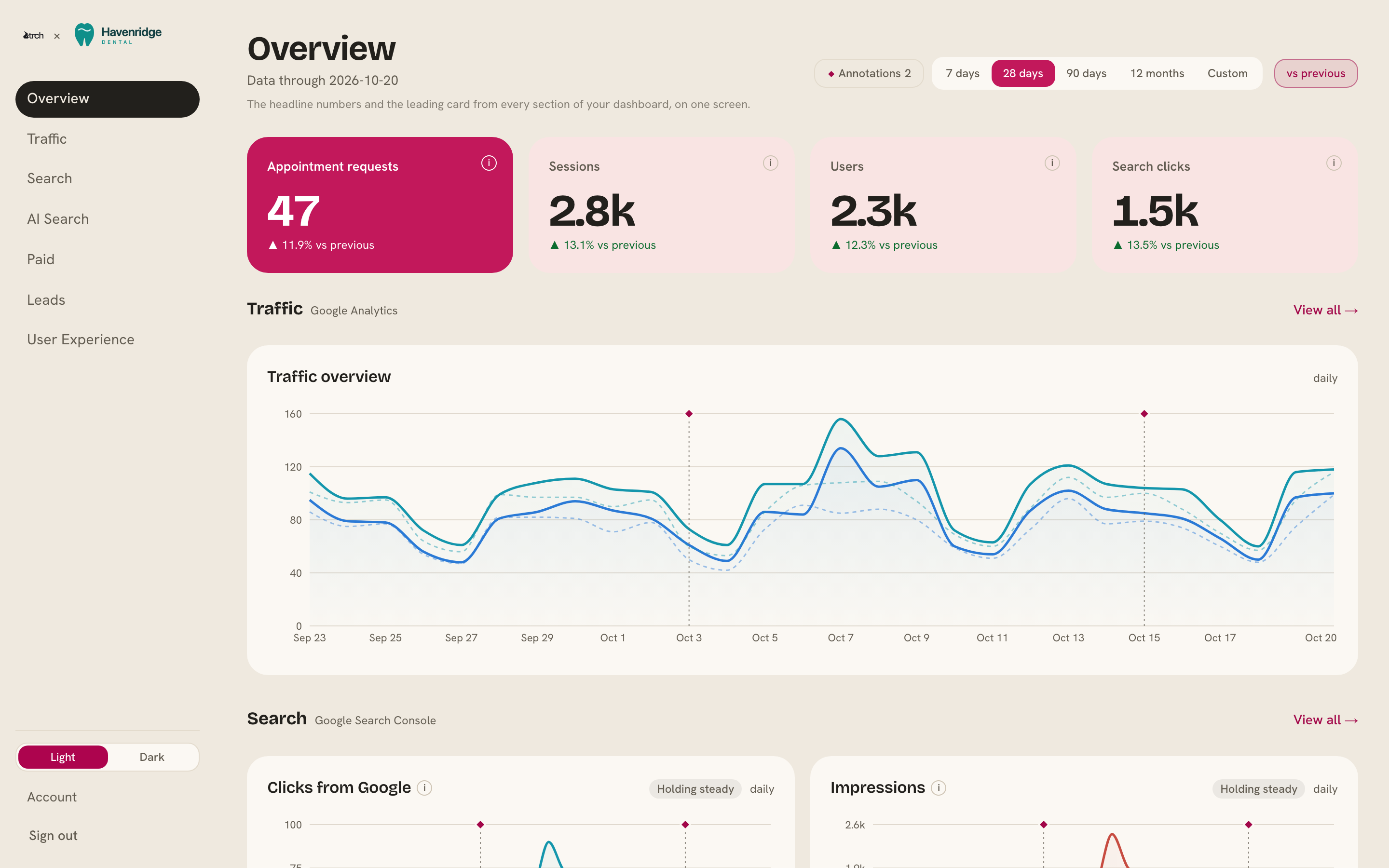
It's your own Google Analytics and Search Console, translated. Every headline number comes with a short note on what it means and how to read it.
Leads
The form fills and bookings that count for your business, set up as goals on your call, and which channels brought them in.
Visitors
How many people came and where they came from: Google, social, ads, other websites, email.
Search
What people typed into Google before they found you, and how many of them clicked through.
AI search
Visits from ChatGPT, Gemini, Perplexity and the other AI assistants, because they're starting to send people to websites like yours.
How your pages hold up
Load speed as real Chrome visitors experienced it, and how many of your pages Google has indexed, wherever Google has the data.
Every number is compared with the period before it, so “up 14%” or “down 6%” is right there and you don't have to work it out.
It updates twice a day. And on day one we bring in up to two years of history, so you can compare this quarter with the same quarter last year from the start. (Google keeps 16 months of search data.)
Works with what you already pay for
Google Analytics and Search Console are the start. If you run ads or collect leads through a form, we connect those on the same setup call, and every form fill on your website shows up as a lead under the goal it belongs to. Same $69. Nothing is an add-on.
 Google AnalyticsWho visited, where they came from, and the pages they read.
 Google Search ConsoleWhat people searched before they clicked through to you.
 Google AdsSpend, clicks and leads, and whether you're on track for the month's budget.
 LinkedIn AdsSpend and clicks, plus the leads from LinkedIn's own lead forms.
 HubSpotEvery form fill, counted as a lead.
 Gravity FormsEvery entry on your WordPress forms, counted as a lead.
 FormspreeEvery submission, counted as a lead.
 Microsoft ClarityWhere visitors get stuck: rage clicks, dead clicks and quick backs.
- More on the wayUsing something that isn't here? Ask us on your call.
Once a month, it comes to you.
Once a month, an email lands with your headline numbers and a few plain-English lines on what changed. It's written automatically, and it says so.
See one before you buy
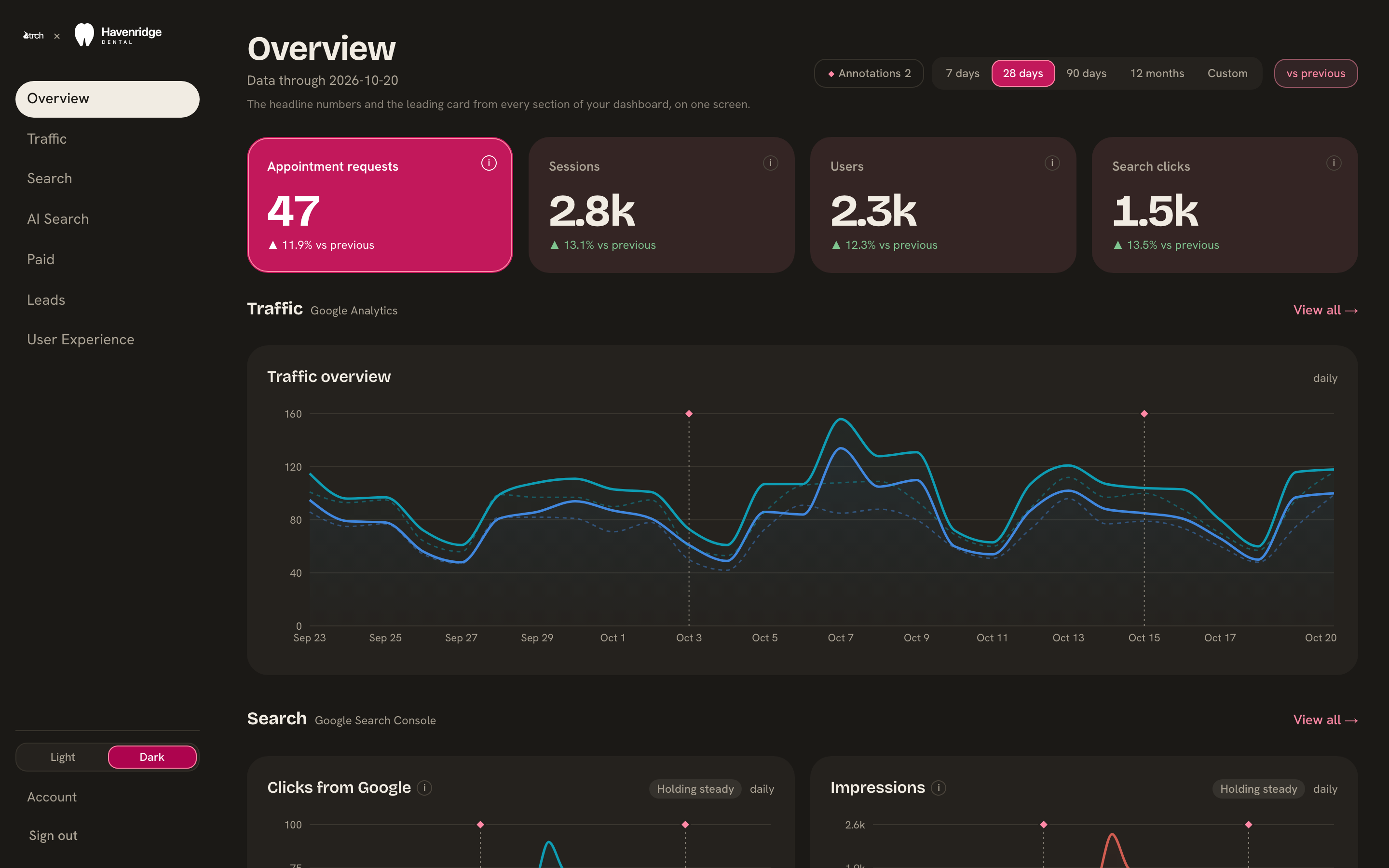
Havenridge Dental is a made-up dental practice with a year of made-up data. Its dashboard is the real thing. Click around as long as you like.
Open the demoHow it starts
Pick monthly or annual, and pay. You'll get an email to set your password.
We email you within one business day to book your setup call.
On the call, we connect your accounts and set up your goals.
Your dashboard fills in, history included.
We only ever read your numbers. View-only access means we can't change anything in your Google accounts, and you can remove it whenever you like.
Questions go to a person
Email support@trch.com and someone at TRCH answers within one business day. If a number looks wrong, or you want to know why last Tuesday spiked, ask.
$69 a month, per website
Monthly
$69a month
Try it for 14 days. If it isn't for you, we refund your first payment in full. After that, cancel anytime and you keep your dashboard to the end of the month you've paid for.
Start monthlyAnnual
$690a year
That's two months free. Try it for 14 days, and if it isn't for you, we refund all of it. After 14 days there's no refund, and your dashboard stays open to the end of the year.
Start annualNo setup fee; the setup call is included. Running more than one website? Each one is its own dashboard at $69. You pay up front and have 14 days to decide. If you'd rather look first, the demo shows exactly what you're paying for.
Questions
Do I need to understand Google Analytics?
No. That's the whole idea. You'll read your dashboard the way you'd read a bank statement, and when something doesn't make sense, you email us.
What if I don't have Google Analytics or Search Console yet?
We set them up with you on the setup call, at no extra cost. Your numbers start from that day, so the first few weeks look thin and it fills in from there.
What can you see, and what can you change?
We see the numbers in your Google Analytics and Search Console, with view-only access, and that's all. We can't change your accounts or your website, and you can remove our access from inside Google at any time.
Can you track key events or custom dimensions?
Yes, but view-only access isn't enough for that. Setting up key events or custom dimensions means changing settings in your Google Analytics, so we'd need Editor access for that part. Tell us on your setup call and we'll walk you through it. You can switch us back to view-only once it's done.
Who else sees my data?
You, anyone you ask us to give a login to, and TRCH. We don't share it or sell it.
Can someone else on my team log in?
Yes. Email support@trch.com with their address and we'll add them.
What happens when I cancel?
Your dashboard stays open until the end of the period you've paid for. Then it closes, and we delete your data within 90 days. Come back before then with the same email and website, and your dashboard picks up where it left off.
Is this the same dashboard TRCH's clients get?
Yes, the same one. Clients on a TRCH retainer also get written notes from the team each month. This plan doesn't include those.
What's AI search?
Visits that came from an AI assistant such as ChatGPT, Gemini or Perplexity because it cited or linked to your site. We show how many came, which assistants sent them, the pages they landed on and what they did next.
Built by TRCH
TRCH is a marketing advisory. We built this dashboard for our own clients, so they could see what their websites were doing without learning Google Analytics, and it's the same one you're looking at.
If you ever want more than a dashboard, someone to look at the numbers with you and tell you what to do about them, that's what TRCH does.
Meet TRCH →